A short blackout shouldn’t cost you a half-finished render, a saved game, or three hours of unsaved paperwork. The right battery backup quietly sits between your gear and the wall, smoothing voltage dips and buying you enough runtime to save and shut down when the grid cuts out. This list covers home offices, gaming setups, NAS rigs, and rack-mounted hardware, so you can match capacity and form factor to what you actually run.
A Quick View Of The Lineup

CyberPower CP1500AVRLCD3 Intelligent LCD UPS Battery Backup

CyberPower CP1500PFCLCD PFC Sinewave UPS Battery Backup and Surge Protector

CyberPower EC850LCD Ecologic UPS Battery Backup and Surge Protector
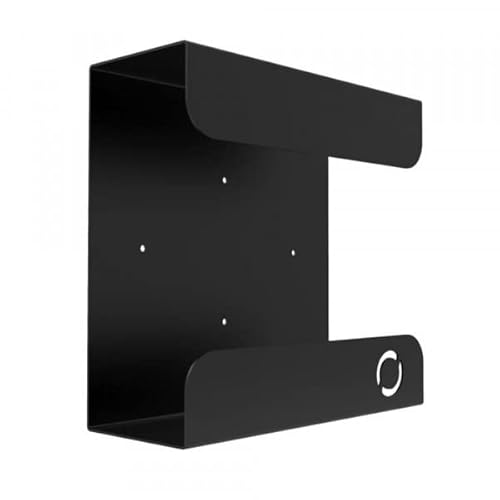
UPS Mount 143 (Single) Wall Mount for UPS

CyberPower ST425 Standby UPS Battery Backup and Surge Protector

CyberPower ST625U Standby UPS Battery Backup and Surge Protector

CyberPower CP2000PFCRM2U PFC Sinewave UPS Battery Backup

CyberPower OR500LCDRM1U Smart App LCD UPS Battery Backup

UGREEN NAS UPS US3000 12000mAh Battery Backup

CyberPower CP1500PFCRM2U PFC Sinewave UPS Battery Backup
What Each Pick Brings To The Table
The CP1500AVRLCD3 lands as the classic mini-tower workhorse for a home office, with a front-facing LCD that puts battery level, load, and voltage right at eye level. Automatic Voltage Regulation (AVR) is the quiet hero here, smoothing brownouts and small spikes so the battery only kicks in when the grid actually fails. For a desktop PC, monitor, modem, and router, the simulated sine wave output handles routine gear without fuss.
It’s the kind of unit you tuck under a desk and forget until the lights flicker. Owners commonly use the LCD to glance at load percentage when adding devices, which keeps you from overloading outlets accidentally. The trade-off is that active PFC power supplies on modern workstations sometimes prefer pure sine wave output, which the next pick handles better.
Noteworthy Benefits
- Front LCD shows load, battery level, and input voltage in real time, so you can see exactly when the grid wobbles.
- AVR trims minor voltage dips without draining the battery, stretching runtime for actual outages.
- Mini-tower form factor slides under a desk or beside a filing cabinet without dominating floor space.
- Multiple outlets let you protect a tower, monitor, router, and a printer or NAS on a single unit.
Things To Consider
- Simulated sine wave output may not suit workstations with active PFC power supplies, where pure sine wave is the safer match.
- Replacement batteries are inevitable every few years, depending on how often the unit cycles.
Quick Facts
Built With In Mind
Home office users running a single desktop tower, monitor, and networking gear who want clear at-a-glance diagnostics.
Reach For A Different Pick When
Your workstation uses an active PFC power supply, in which case the CyberPower CP1500PFCLCD PFC Sinewave UPS delivers true sine wave output that those PSUs prefer.
Where the previous CP1500AVRLCD3 uses simulated sine wave, this sibling steps up to a true sine wave output that active PFC power supplies actually like. Many modern workstations, gaming towers, and higher-end A/V gear need that cleaner waveform to avoid nuisance shutdowns or PSU stress during a battery transfer. The color multifunction control panel keeps the same LCD diagnostic feel, so you still see load and runtime without booting software.
For a serious home office or a creator rig with a beefy PSU, this is the safer play. It shares the AVR feature from pick one, meaning it corrects small grid swings without dipping into battery reserves. The honest read is that pure sine wave is overkill for a basic desktop, so you mostly pay for capability you only need if your PSU is PFC-active.
Real-World Strengths
- True sine wave output pairs cleanly with active PFC power supplies in modern workstations and gaming towers.
- Color LCD control panel surfaces status without requiring the bundled software to be installed.
- AVR handles minor voltage dips on its own, reserving battery runtime for actual outages.
- Outlet count supports a tower, dual monitors, and networking gear from a single unit.
Honest Caveats
- Pricing typically runs higher than simulated sine wave alternatives at similar VA ratings.
- Battery replacement cycles still apply, and replacements need a brief shutdown window.
Whose Shelf It Belongs On
Anyone running a workstation, gaming PC, or A/V rig with an active PFC power supply that needs a cleaner waveform during outages.
Swap It Out When
You mainly protect a simple desktop and modem/router, where the CyberPower EC850LCD Ecologic UPS is a tighter, lower-cost fit.
The EC850LCD shrinks the UPS concept down to something you can park beside a small desk without it dominating the space. It uses standby topology, meaning it passes wall power straight through until the grid cuts out, then switches to battery. For a desktop tower, monitor, modem, and router, that’s plenty of muscle during a brief outage, and the Ecologic feature lets the unit shut down attached devices gracefully when the host PC sleeps.
The included LCD screen keeps the diagnostic feel of larger CyberPower units, which is rare at this size class. The honest trade-off is that standby topology doesn’t correct minor voltage swings the way the line-interactive picks do, so in regions with chronically dirty power, you’ll cycle the battery more often.
Standout Benefits
- Compact footprint suits small desks, dorm setups, and shelf placement without blocking airflow.
- LCD panel surfaces battery and load status on the unit itself, no software needed.
- Ecologic mode shuts down protected outlets when the host PC sleeps or powers off, saving battery wear.
- Enough outlets for a tower, monitor, and networking gear in one tidy package.
Points To Keep In Mind
- Standby topology doesn’t regulate minor voltage dips, so the battery kicks in more often on dirty lines.
- Simulated sine wave output means you should confirm compatibility with active PFC power supplies.
Right Fit For
Home users running a single desktop tower, monitor, and networking gear in a small space who want a tidy, unobtrusive unit.
A Better Fit Elsewhere
Power users with active PFC workstations should look at the CyberPower CP1500PFCLCD PFC Sinewave UPS for true sine wave output.
This one breaks the pattern. Instead of a UPS itself, it’s a steel wall mount sized to hold common mini-tower UPS units from APC and CyberPower. The flat black powder coat finish blends into a home office or server closet, and the included mounting hardware removes the “do I have the right screws” problem. A 70 lb weight capacity covers every pick on this list and then some.
For someone whose UPS currently sits on the floor collecting dust bunnies, this mount lifts it off the carpet and out of accidental kick zones. Dimensions of 11D x 4.3W x 10.65H are tuned to common mini-tower footprints, so you should measure your unit first. Multi-packs are available for offices running several UPS units in parallel.
What Earns Its Place
- Steel construction with a flat black powder coat finish holds up to 70 lb, well above typical UPS weights.
- Compatibility spans common APC and CyberPower mini-towers, which covers most home office installs.
- Included mounting hardware means you can install without a separate trip to the hardware store.
- Wall-mounting keeps the UPS visible for status checks and off the floor in flood-prone basements.
Practical Considerations
- Dimensions need to match your specific UPS, so measure your unit’s depth, width, and height before ordering.
- Wall mounting requires locating studs or using appropriate anchors, which adds a small install step.
Best Suited To
Tidy home office and small server closet owners who want their UPS visible, labeled, and lifted off the floor.
Skip It When
You don’t actually own a UPS yet, since this is an accessory for the units above and below it.
The ST425 is the entry point into the CyberPower line for people running a small desktop, a modem, and a router. Standby topology keeps the design simple: pass wall power through, switch to battery only when the grid actually cuts out. For a home PC that needs a few minutes to save and shut down, that’s exactly the right behavior.
It’s the kind of unit you plug in once and don’t think about again until the lights flicker. Surge protection covers lightning-induced spikes and other everyday power events that can quietly fry a motherboard. The catch is that the runtime window is shorter than the larger mini-towers, so a heavy gaming PC will drain it fast.
The Helpful Details
- Compact standby design tucks behind a monitor or beside a small desk without crowding your workspace.
- Surge protection covers lightning-induced events and routine power spikes that can damage electronics.
- Enough outlets for a basic tower, monitor, and networking stack on a single strip.
- Simple plug-and-play setup with no software required for basic protection.
Some Limits To Know
- Standby topology doesn’t regulate minor voltage swings, so battery cycles more often on dirty lines.
- Runtime is modest compared to the larger mini-tower picks on this list.
Who It Suits Best
Light home users with a basic desktop, monitor, and modem/router who just need a few minutes of safe shutdown time.
Look Elsewhere When
You run a workstation with a higher-watt PSU or active PFC, where the CyberPower CP1500AVRLCD3 from pick one is a stronger match.
Step up from the ST425 and you land at the ST625U, which adds USB charging ports right on the front of the unit. That’s the small but meaningful difference for a mixed home office where phones, tablets, and a wireless headset all need a top-up during the day. It still uses standby topology, so the core behavior stays simple: pass power through, switch to battery on outage.
The ST625U is a quietly flexible choice because the USB ports free up your wall outlets for actual gear. You can keep a phone topped up while the UPS handles the bigger stuff behind it. The honest read is that for a clean home office, the built-in ports are a small quality-of-life win that adds up across a workday.
What Helps Most
- Front-facing USB charging ports let you top up phones and tablets without burning wall outlets.
- Surge protection handles lightning-induced events and routine power spikes that hit home electronics.
- Standby design keeps the unit simple to install and operate, with no software required for basic use.
- Compact footprint suits small desks and shelves where larger mini-towers won’t fit.
Trade-Offs To Consider
- Standby topology doesn’t actively regulate minor voltage dips, so the battery cycles more on unstable lines.
- Runtime is still modest compared to the higher-wattage mini-towers and rackmounts on this list.
Perfect Match For
Home office users with mixed gear who want USB device charging built into their UPS, freeing up wall outlets.
Not Your Match When
You need AVR or longer runtime for a workstation, where the CyberPower CP1500AVRLCD3 covers both needs.
The CP2000PFCRM2U jumps into rackmount territory and into higher wattage, which is what security systems, A/V components, and network gear with active PFC power supplies actually demand. True sine wave output means the transfer from grid to battery happens without the rough edges that can trigger sensitive PSU protection circuits. EMI/RFI noise filtering adds another layer of protection against the kind of electrical chatter that gradually degrades hardware.
Compared to the desktop picks above, this unit assumes you have a rack cabinet or at least a sturdy shelf that can handle a 2U chassis. Automatic Voltage Regulation is built in, so it corrects minor dips without dipping into battery reserves, just like the mini-tower CP1500AVRLCD3 from pick one. The trade-off is footprint: this is overkill for a home office with a single tower.
What Works In Its Favor
- True sine wave output pairs cleanly with active PFC power supplies in security and A/V gear.
- Higher watt rating supports rack cabinets with multiple switches, recorders, and small servers.
- AVR corrects minor voltage dips without burning battery runtime, leaving reserves for actual outages.
- EMI/RFI filtering reduces electrical noise that can slowly degrade sensitive electronics over time.
Room For Improvement
- 2U rackmount form factor needs a real cabinet or sturdy shelf, which most home offices don’t have.
- Higher capacity means heavier weight and a longer battery-replacement window when it comes.
Who Will Love This
Home lab and small business owners running rack cabinets with security systems, switches, and A/V gear requiring active PFC compatibility.
Consider Something Else When
Your entire setup fits on a desktop, in which case the CyberPower CP1500AVRLCD3 keeps the install simpler.
The OR500LCDRM1U squeezes UPS, AVR, and an LCD into a 1U rackmount chassis that fits cleanly at the top or bottom of a small server rack. At 500VA/300W with six outlets, it covers a department server, a workgroup server, network devices, and telecom gear that doesn’t need active PFC compatibility. Simulated sine wave output is fine for those traditional server-class power supplies.
The Smart App LCD branding means there’s a multifunction display plus companion software that can push status to a connected PC. For a server closet where a quick glance at the rack should tell you whether the UPS is healthy, that’s a real workflow win. Compared to the bigger CP2000PFCRM2U above, you give up watt capacity but gain a tighter 1U footprint.
What It Does Well
- 1U rackmount chassis fits standard server racks without eating valuable vertical space.
- AVR corrects minor voltage dips without dipping into battery reserves, saving runtime for actual outages.
- Multifunction LCD surfaces status without requiring the companion software to be installed.
- Six outlets handle a small server plus switches, patch panels, and telecom gear on a single unit.
Potential Drawbacks
- Simulated sine wave output rules out active PFC power supplies, so confirm compatibility before mounting.
- 500VA/300W capacity is modest for racks with multiple servers running simultaneously.
Made For
Small server closet owners running traditional servers, switches, and telecom gear without active PFC power supplies.
Where Another Pick Suits Better
Racks with active PFC gear should choose the CyberPower CP1500PFCRM2U, which delivers true sine wave output.
The US3000 is the odd one out on this list because it isn’t a generic UPS, it’s purpose-built for UGREEN’s 2-bay and 4-bay NAS units. A 120W DC output and a 12000mAh internal Li-ion battery give your NAS enough runtime to write through a short outage and shut down cleanly, which is exactly what NAS drives need to avoid filesystem corruption. It plugs straight into the NAS’s DC input, so there’s no bulky inverter in the loop.
Compact and quiet, it sits next to a NAS without adding audible clutter to a home office. The compatibility list is explicit: DXP2800, DXP4800, DXP4800 Pro, DXP4800 Plus, DXP480T, DH4300 Plus, and DH2300. If your NAS isn’t on that list, or if it’s a DXP6800 or DXP8800 series, this unit simply won’t work for you.
Key Advantages
- Purpose-built DC UPS for UGREEN 2-bay and 4-bay NAS units, eliminating inverter inefficiency.
- 12000mAh Li-ion battery delivers enough runtime for safe shutdown during short outages.
- Quiet operation and compact size blend into a NAS setup without adding fan noise or bulk.
- Built-in protections cover surge, over-charge, over-current, and short-circuit scenarios.
Factors To Consider
- Compatibility is narrow: only specific UGREEN NAS models are supported, so verify yours first.
- DC-only design means it won’t protect desktops, routers, or any gear that needs AC outlets.
The Right Fit
UGREEN NAS owners with a supported 2-bay or 4-bay model who want clean shutdown protection during outages.
Wrong Turns To Avoid
If you don’t own one of the listed UGREEN NAS models, skip this entirely; a generic UPS like the CyberPower CP1500AVRLCD3 is the right starting point instead.
Closing out the list, the CP1500PFCRM2U is the rack-mount sibling of the desktop CP1500PFCLCD from pick two, bringing true sine wave output to a 2U chassis. Security systems, A/V equipment, and networking gear with active PFC power supplies get the same clean waveform, with AVR correcting small dips before they touch the battery. EMI/RFI filtering rounds out the protection.
For a home lab or small rack that needs PFC compatibility without stepping all the way up to the 2000VA CP2000PFCRM2U from pick seven, this is the sweet spot. Owners commonly use the multifunction LCD for at-a-glance status checks and the companion software for unattended shutdown signaling. The trade-off is that any 2U rackmount demands a real rack cabinet, not a desk shelf.
Where It Excels
- True sine wave output pairs with active PFC power supplies in security, A/V, and network gear.
- AVR handles minor voltage dips without dipping into battery reserves, saving runtime.
- EMI/RFI noise filtering reduces electrical chatter that degrades sensitive electronics over time.
- 2U rackmount form factor slots cleanly into standard server cabinets alongside switches and patch panels.
Less Ideal Details
- 2U form factor needs a real rack cabinet or sturdy shelf, which most home offices don’t have.
- Mid-range watt capacity caps the number of simultaneous devices you can protect.
Who Should Grab It
Home lab and small business owners running a rack with active PFC gear who want sine wave output without paying for the higher-watt CP2000PFCRM2U.
A Better Fit Elsewhere
Anyone without a rack cabinet should choose the CyberPower CP1500PFCLCD from pick two, which delivers the same sine wave output in a mini-tower.
Buying Guide: Matching A UPS To Your Setup
Capacity And Runtime
The first honest question is how much gear you actually need to keep alive during an outage. A desktop tower plus a monitor and a router draws noticeably less than a gaming PC with two monitors and a streaming setup, and that gap shows up directly in runtime minutes. A general rule of thumb is to size the UPS so the connected load sits in the 40 to 60 percent range of its rated capacity, which leaves headroom for power spikes on startup and stretches runtime during an actual outage.
Waveform And PSU Compatibility
Simulated sine wave is fine for most desktops, monitors, and networking gear, but active PFC power supplies in modern workstations and gaming towers prefer pure sine wave output. The mismatch shows up as unexpected shutdowns when the UPS transfers to battery, because the simulated waveform briefly looks alien to the PSU’s protection circuitry. If your PSU is PFC-active, leaning toward a true sine wave model is the safer call.
Topology And Power Quality
Line interactive UPS units include AVR, which corrects minor voltage dips without switching to battery at all. Standby units pass grid power straight through until the outage actually happens, which means they cycle the battery more on dirty lines. In regions with chronic brownouts, line interactive tends to deliver longer battery life and quieter operation over years of ownership.
Form Factor And Placement
Mini-towers fit under a desk or beside a filing cabinet. 1U and 2U rackmounts demand a real rack cabinet or a sturdy shelf rated for the weight. Wall-mount accessories like the Oeveo UPS Mount lift a mini-tower off the floor, which is useful in basement offices or anywhere flood risk is a concern.
Reading The Field: Choices And Trade-offs
Pitfalls Shoppers Hit
A common mistake is sizing a UPS by outlet count instead of actual load, then watching the unit overload the moment a laser printer powers on. Another is buying a simulated sine wave unit for an active PFC workstation, which leads to nuisance shutdowns that the UPS was meant to prevent. A third is placing a UPS in a sealed closet where heat builds up, which shortens battery life noticeably over a few years.
What The Higher Tier Buys
Stepping up from standby to line interactive brings AVR, which keeps the battery fresher on unstable lines. Moving from simulated to true sine wave adds clean output for active PFC power supplies, which protects the more expensive PSUs in modern workstations and A/V gear. Higher VA ratings buy longer runtime and more outlets, but only matter when your actual load justifies the jump. For a single desktop, the lower tiers cover the basics; for a rack or a creator rig, the upgrade pays for itself in fewer shutdown headaches.