A sudden blackout mid-project can cost you hours of unsaved work and, worse, shorten the lifespan of desktop hardware that takes voltage swings hard. Modern home offices and small studios run on tight uptime tolerances, and a single storm or brownout can wreck a motherboard before you even reach the save button. Battery backups for computers sit quietly between your wall outlet and your gear, smoothing out the noise and giving you the minutes you need to shut down cleanly.
The ten options below cover tower setups, rack installs, compact workstations, and the accessories that keep a UPS where it belongs. Each pick is mapped to a specific kind of user, so you can jump to the one that matches your room, rack, and runtime expectations.
A Snapshot Of The Selections

CyberPower CP1500AVRLCD3 Intelligent LCD UPS

CyberPower CP1500PFCLCD PFC Sinewave UPS

CyberPower EC850LCD Ecologic UPS
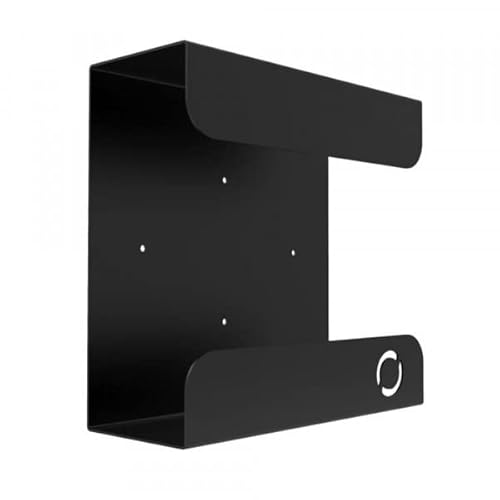
Oeveo UPS Mount 143 Wall Bracket

CyberPower ST425 Standby UPS

CyberPower ST625U Standby UPS

APC Replacement Battery APCRBC123

CyberPower CP2000PFCRM2U PFC Sinewave UPS

CyberPower OR500LCDRM1U Smart App UPS

CyberPower CP1500PFCRM2U PFC Sinewave UPS
A Deeper Look At The Lineup
Tower-style desktops and home studios find a comfortable match in the CP1500AVRLCD3. It runs on line-interactive topology, meaning it actively smooths small dips and spikes without flipping to battery every time a refrigerator kicks on across the room. That kind of behavior matters when you are running a workstation through long renders or compiling code for hours.
The unit pairs that conditioning with an LCD that shows input voltage, load, and battery state on one tidy panel. For most home offices, the trade-off is a slightly larger footprint than the compact picks later in this list, but the runtime headroom tends to pay off the first time a summer storm knocks power out mid-meeting.
Positive Takeaways
- Automatic Voltage Regulation trims brownouts before touching the battery, which extends cell life over years of service.
- The LCD panel removes guesswork by showing real load and runtime numbers at a glance.
- Tower sizing covers a full desktop plus monitor and modem without breaking a sweat.
- Surge protection covers every connected outlet, so a single strike does not chain through your gear.
Things To Consider
- Simulated sine wave output may not play nicely with every active PFC power supply, so check compatibility if your PC uses one.
- The footprint can crowd a small media console, especially when paired with oversized power bricks.
- Replacement batteries are straightforward to find, but you should budget for a swap every few years of heavy use.
Key Specs
Built With In Mind
Home office users running a single desktop with a monitor, modem, and a couple of peripherals benefit most from the runtime and the on-screen diagnostics.
Look Elsewhere When
Power users with active PFC workstations should reach for the CyberPower CP1500PFCLCD PFC Sinewave UPS, which delivers a cleaner output for those sensitive supplies.
Step up to a sine wave UPS and you stop worrying about how your power supply tolerates a stepped waveform. The CP1500PFCLCD outputs a true sine wave, which lines up cleanly with active PFC (Power Factor Correction) supplies used in many modern desktops, workstations, and gaming rigs. That compatibility alone removes a stubborn class of shutdown errors that cheaper units trigger.
Where the previous pick relies on simulated sine wave, this unit leans on a color multifunction LCD for status readouts. Owners with denser rigs tend to appreciate the headroom, since sine wave circuitry can be more efficient under heavy load. You may find the extra weight and price hard to justify for a basic office, but for a high-end workstation it is a sensible upgrade.
Reasons It Performs
- True sine wave output keeps active PFC power supplies stable, preventing the random reboots you can hit with stepped waveforms.
- Color LCD consolidates status, battery level, and load into one readable surface.
- Line-interactive conditioning helps extend battery life by absorbing small dips internally.
- EMI and RFI filtering reduces line noise that can degrade audio interfaces and sensitive capture cards.
Trade Offs
- Costs noticeably more than simulated sine wave options of similar capacity.
- Tower body sits heavier and larger than compact picks, which may matter under a low desk.
- Replacement batteries are widely available but require a small screwdriver and a few minutes of swap time.
Whose Shelf It Belongs On
Creative professionals, engineers, and gamers running active PFC power supplies get the most from a true sine wave output that matches what their gear expects.
Consider Something Else When
Tight desk setups with modest loads should look at the CyberPower EC850LCD Ecologic UPS, which trades some capacity for a much smaller footprint.
When desk space is at a premium and your tower pulls modest wattage, the EC850LCD makes sense. The unit runs on standby topology, which means it switches to battery only when the wall supply drops out rather than conditioning every minor wobble. For an apartment with stable grid power, that lighter approach is plenty.
Where the tower CyberPower picks above stretch across wide shelves, this one tucks behind a monitor or under a low credenza. The Ecologic feature also detects when your computer enters sleep or shuts off, and reduces its own power draw accordingly. It is a small thing, but over a year of idle time it adds up on the energy bill.
Bright Spots
- Compact footprint fits tight desks where a tower UPS would cramp your setup.
- Ecologic idle reduction helps trim standby power once your PC is asleep or off.
- LCD readouts keep the basic status info visible without taking up front-panel space.
- Simulated sine wave output is fine for typical mid-range desktops that lack active PFC.
Honest Caveats
- Runtime is shorter than the 1500VA tower picks, so you get minutes rather than long stretches for graceful shutdowns.
- Standby topology does not correct small brownouts, only full outages, which can matter on unstable grids.
- Outlet count is modest, so plan around a small power strip if you have many peripherals.
Who It Suits Best
Apartment dwellers, dorm rooms, and minimal home offices running a single modest desktop benefit most from the EC850LCD’s compact body.
A Better Fit Elsewhere
Anyone running active PFC hardware or needing longer runtime should pick the CyberPower CP1500PFCLCD PFC Sinewave UPS instead.
Even the best UPS looks awkward sprawled on a basement floor, tangled with cables and dust bunnies. The Oeveo UPS Mount 143 lifts your battery backup off the ground and pins it to the wall, turning a bulky plastic box into wall-mounted infrastructure. It works with both APC and CyberPower units, which covers most home and small-office installs.
The 70-pound weight capacity is far more than any home UPS needs, so the bracket easily holds a tower unit plus cables. Mounting hardware is included, so you only need a stud finder and a drill. You may find a drywall anchor is enough for lighter mini-towers, though a stud mount is the safer long-term route.
Where It Helps
- Frees up floor space in closets, basements, and small server rooms where UPS gear tends to crowd.
- Flat black powder coat finish blends with most AV and IT racks without looking out of place.
- Universal compatibility across APC and CyberPower covers the common home and small-business brands.
- Multi-pack options exist for shops that deploy several units in one room.
Points To Keep In Mind
- Installation requires basic tools and a stud or anchor capable of holding the UPS plus its cabling weight.
- Dimensions are tuned to common tower footprints, so unusual UPS shapes may not seat perfectly.
- Not a battery or backup itself, so it adds nothing to runtime or protection on its own.
Right Fit For
Anyone tired of UPS hardware collecting dust on the floor next to their rack or desk.
Skip It When
Rackmount users should pick the CyberPower OR500LCDRM1U Smart App UPS instead, which mounts directly into standard rack rails.
Tight budgets and simple setups meet the ST425, a small-footprint standby UPS built for one desktop plus a monitor. Like the EC850LCD earlier, it waits for an outage before kicking the battery in, so it leans on the wall for normal operation. That makes it lighter and easier to place than line-interactive tower units.
Where larger tower picks give you double-digit minutes of runtime, this one offers the few minutes needed to close documents and power down. For most home desks, that is exactly the safety net you want without overspending on capacity you will never use. Surge protection rounds out the value, absorbing the lightning-induced spikes that frying power supplies in summer storms.
Features That Help
- Low cost entry point for a single-PC home office.
- Compact body slides under most desks or behind a monitor stand.
- Surge protection covers all connected outlets against lightning-induced spikes.
- Standby operation keeps internal heat low, which is gentle on the battery.
A Few Limitations
- Runtime is short, so you will be saving and shutting down rather than working through an outage.
- Simulated sine wave output is not a fit for active PFC power supplies.
- Limited outlet count restricts how many peripherals you can plug in directly.
Made For
First-time UPS shoppers who just want safe shutdowns for a basic home desktop.
Reach For A Different Pick When
Anyone running a heavier workstation with active PFC should pick the CyberPower CP1500PFCLCD PFC Sinewave UPS for proper compatibility.
The ST625U takes the small standby UPS concept and adds a USB monitoring port, letting your computer talk to the unit and trigger an automated shutdown. That single cable changes how the UPS behaves in real outages, since the operating system can save open files and power off without you touching a thing.
Compared to the slimmer ST425 just above, this unit bumps the capacity enough to give you a couple more minutes of breathing room. For a single-PC setup with a monitor and a small printer or NAS, that headroom is often the difference between a clean shutdown and a corrupted file. It is a quiet upgrade that pays off the first time the lights flicker during a critical save.
Real Benefits
- USB communication enables automatic, unattended shutdowns during outages.
- Slightly higher capacity than the entry ST425 for more graceful shutdowns.
- Surge protection handles lightning-induced spikes on every connected outlet.
- Compact, lightweight body suits small desks and rolling carts.
Worth Noting
- Standby topology means no brownout correction, only full outage protection.
- Simulated sine wave is not safe for active PFC power supplies.
- USB cable and software setup may require a few minutes for first-time users.
Who Should Grab It
Single-PC users who want automated shutdowns on a small UPS without moving up to a tower.
Swap It Out When
Offices with multiple peripherals or heavier loads should pick the CyberPower CP1500AVRLCD3 Intelligent LCD UPS instead for proper runtime.
Every UPS dies a slow death as its internal battery ages, and the APC APCRBC123 exists to bring that hardware back to life. This replacement cartridge is built and tested for APC SmartUPS units, and swapping it out restores the original runtime and surge response. For shop owners and home power users with an existing APC, this is the only sensible way to refresh the unit.
Unlike every other pick on this list, the APCRBC123 is not a UPS itself. It is a VRLA (Valve Regulated Lead Acid) battery pack in a drop-in form factor. Owners commonly report that a swap takes less than ten minutes once the front bezel is removed, though you should confirm your specific APC model number is in the compatibility list before ordering.
Useful Touches
- Genuine APC build and testing restore original runtime and behavior.
- Drop-in cartridge format keeps swap time to a few minutes with basic tools.
- Extends the life of an existing UPS rather than sending it to a landfill.
- VRLA chemistry is sealed and maintenance-free over its service life.
Practical Considerations
- Not a standalone UPS, so it does nothing for users without a compatible APC unit.
- Must match the exact model number listed for safe operation and proper fit.
- Used batteries require proper recycling, which adds a small step to the swap.
Best Suited To
Existing owners of compatible APC SmartUPS models who want to extend the life of their hardware with an official replacement.
Where Another Pick Suits Better
Shoppers who do not already own a compatible APC should pick the CyberPower CP1500AVRLCD3 Intelligent LCD UPS as a complete backup solution.
Rack cabinets and A/V closets need UPS hardware that mounts cleanly into standard rails, and the CP2000PFCRM2U delivers that with room to spare. The unit outputs a true sine wave, which keeps active PFC supplies in security hardware and recording interfaces happy. Combined with EMI/RFI filtering, it cuts both the long outages and the subtle noise that wrecks sensitive gear.
Compared to the smaller 1500VA rackmount CyberPower later in this list, this one carries noticeably more capacity for studios running multiple computers or a server plus a switch. You may find the 2U height limits how densely you can stack adjacent gear, so plan rack space before ordering. For the kind of room that needs runtime plus rail-mount form factor, this is a natural fit.
Good Reasons To Consider
- True sine wave output suits active PFC power supplies in modern servers and A/V gear.
- EMI and RFI filtering protects sensitive recording interfaces and network equipment.
- Automatic Voltage Regulation trims small fluctuations without burning battery cycles.
- Rackmount form factor drops into standard 19-inch rails in a 2U space.
Points To Watch
- Higher capacity means heavier weight, so rack rails must be rated for the load.
- Larger footprint than tower units, so it makes no sense outside a rack environment.
- Replacement batteries are easy to source but cost more than smaller CyberPower units.
Key Specs
Perfect Match For
Small recording studios, security rooms, and home server racks that need sine wave output and proper rail mounting.
Not Your Match When
Desktop users without a rack should pick the CyberPower CP1500AVRLCD3 Intelligent LCD UPS, which sits on a shelf or floor.
The OR500LCDRM1U slips into a 1U rack slot, which is the thinnest possible profile for rail-mounted backup power. Six outlets provide enough headroom for a switch, a modem, and a couple of servers without taking up a second unit. It runs on line-interactive topology with AVR (Automatic Voltage Regulation), so small brownouts get absorbed before the battery ever sees a load.
Where the heavy-duty CP2000PFCRM2U above serves dense rack rooms, this one fits the more typical home lab or small-office cabinet. The simulated sine wave is not a fit for active PFC supplies, so confirm compatibility if your servers use modern power supplies. For most older switches and entry-level servers, though, it is more than enough.
A Favorable Mix
- 1U rack height keeps the UPS out of the way in shallow cabinets.
- Automatic Voltage Regulation handles minor brownouts without battery use.
- Smart App LCD interface simplifies status checks without external software.
- Six outlets cover switches, modems, and a server without an extra power strip.
Less Ideal Details
- Simulated sine wave is not safe for active PFC power supplies.
- 500VA capacity is modest, so load planning matters for longer runtime.
- 1U rack ears can crowd adjacent vented gear in tight cabinets.
Who Will Love This
Small office IT cabinets and home lab enthusiasts who need a slim rackmount UPS for network gear and entry-level servers.
Another Choice May Suit
Anyone needing true sine wave output or higher capacity should pick the CyberPower CP2000PFCRM2U PFC Sinewave UPS instead.
The CP1500PFCRM2U closes out the lineup as a mid-sized rackmount unit with true sine wave output. It carries enough capacity for a modest rack with switches, a server, and a couple of A/V components, while still fitting into a single rack space with included ears. The EMI and RFI filtration cuts the line noise that can quietly degrade network performance over time.
Compared to the 2U CP2000PFCRM2U earlier, this 1500VA unit is easier on rack rails and lighter to lift during install. Automatic Voltage Regulation keeps small dips from burning battery cycles, which extends the time between battery swaps. You may find the runtime shorter than the heavier 2U unit under a fully loaded rack, so right-sizing the load is worth a quick calculation before ordering.
Advantages To Know
- True sine wave output pairs cleanly with active PFC power supplies in modern rack gear.
- EMI/RFI filtration reduces line noise that can degrade audio and network performance.
- Automatic Voltage Regulation preserves battery life by absorbing minor dips.
- Rack ears included for direct mount into standard 19-inch rails.
Some Limits To Know
- Mid-tier capacity may not stretch to fully loaded dense racks during longer outages.
- Replacement batteries are easy to source but require removing the unit from the rack for swap.
- Heavier than tower units of similar capacity, so mounting rails need proper support.
Key Specs
Who It Suits Best
Mid-size A/V racks and small server cabinets that need true sine wave output without stepping up to the heaviest 2U units.
Where A Sibling Pick Shines
Anyone needing the smallest possible rack footprint for very light loads should pick the CyberPower OR500LCDRM1U Smart App UPS.
Matching The Right UPS To Your Setup
Choosing between these models comes down to three honest questions: how much power your gear actually draws, whether your power supplies use active PFC, and where the unit physically lives. A line-interactive tower like the CP1500AVRLCD3 fits most home offices because it cleans up minor dips without forcing every outlet onto battery. If your desktop uses an active PFC supply, the sine wave output of the CP1500PFCLCD or CP1500PFCRM2U prevents the random reboots that simulated waveforms can trigger.
Runtime expectations matter too. Compact standby units give you minutes for a clean shutdown, while the larger rackmount picks stretch into tens of minutes for full sessions through short outages. Calculate your load in watts, compare it to the rated capacity, and budget headroom for the monitor and any network gear you want to ride through the outage. That single step avoids the most common disappointment, which is discovering too late that your UPS only buys you ninety seconds.
For rack installations, confirm the rails can handle the weight, and leave room above and below for airflow. Tower units in closets and basements stay cleaner and cooler when lifted off the floor, which is where a wall mount like the Oeveo bracket earns its place in the lineup.
Key Considerations Across These Picks
Common Shopping Slip Ups
The most frequent mistake is buying a unit that simulates a sine wave and plugging it into an active PFC supply. The mismatch usually shows up as unexpected shutdowns or reboots during a brownout, which defeats the point of having a UPS. Checking your power supply’s spec sheet for the words “active PFC” before ordering takes a minute and saves hours of frustration.
Another trap is overestimating runtime. Manufacturers rate runtime at very light loads, so a desktop that pulls 200 watts on a 425VA unit may only ride through for a few minutes. Listing your gear’s actual draw and matching it honestly against the rated capacity keeps expectations realistic.
Where The Extra Money Goes
Sine wave output, higher VA ratings, and AVR are the three main places premium models charge more. Sine wave circuitry costs more to build, which is why the CP1500PFCLCD and CP1500PFCRM2U sit above simulated units. AVR, meanwhile, reduces battery wear over years of service by absorbing small fluctuations internally, which delays the day you need a replacement cartridge.
The upgrade makes sense for anyone running active PFC hardware, working through outages rather than just shutting down, or installing in a rack where downtime carries real cost. For a simple home desktop in a region with stable grid power, a compact standby unit covers the same job without the extra spend.
Frequently Asked Questions
How long will a UPS keep my computer running during an outage?
Runtime depends on the load your gear draws and the unit’s VA rating, not a single fixed number. A compact standby UPS might buy you three to five minutes for a desktop, while a 1500VA tower can stretch that to fifteen or twenty minutes for lighter loads.
What is the difference between simulated sine wave and true sine wave output?
Simulated sine wave approximates the wall’s AC waveform in stepped chunks, which works for most basic electronics. True sine wave mirrors the smooth wave your utility supplies, which active PFC power supplies in modern desktops and servers require for stable operation.
Do I really need AVR in a UPS?
AVR corrects small dips and spikes without engaging the battery, which extends battery life over years of use. For regions with frequent minor fluctuations, it reduces the number of charge cycles the battery goes through and delays the day you need a replacement.
Can I mount a tower UPS in a server rack?
Tower units generally do not fit standard rack rails without an adapter shelf, and the depth often exceeds rack cabinet dimensions. For rack installations, choosing a purpose-built rackmount UPS like the OR500LCDRM1U or CP1500PFCRM2U gives a cleaner, safer result.
How often should I replace the battery inside my UPS?
VRLA batteries in most UPS units last roughly three to five years under normal use. Many units beep or show a replace-battery indicator when internal cells degrade, which is the practical cue to swap in a fresh cartridge.
Closing Remarks
Battery backups for computers earn their keep in the moments you cannot predict, from brief flickers to full neighborhood outages. The right unit matches your hardware, your space, and the kind of shutdown you can live with. Take stock of your actual load, confirm whether your supplies need sine wave, and the rest of the decision tends to fall into place.