A sudden brownout mid-meeting, a flickering storm knocking out your home office, or a quick blip that scrambles an unsaved file: these are the small frustrations that decide whether your gear shrugs it off or pays the price. The right battery backup ups quietly sits between your electronics and the wall, smoothing out the rough moments so you never lose work, save progress, or replace a fried router. This lineup focuses on real-world scenarios, from compact standby units for a single workstation to rackmount sine wave systems for AV and security closets. Whether you’re protecting a gaming PC, a NAS, or a small business rack, the picks below cover the most common use cases without overselling a single feature.
A Quick View Of The Lineup

CyberPower CP1500AVRLCD3 Intelligent LCD UPS Battery Backup

CyberPower CP1500PFCLCD PFC Sinewave UPS Battery Backup

CyberPower EC850LCD Ecologic UPS Battery Backup
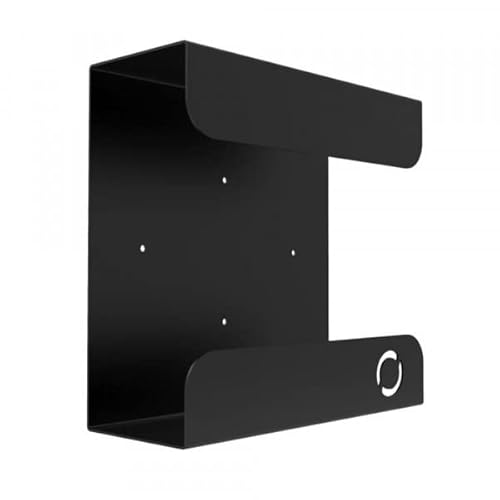
Oeveo UPS Mount 143 Wall Mount for UPS

CyberPower ST425 Standby UPS Battery Backup

CyberPower ST625U Standby UPS Battery Backup

APC Genuine UPS Replacement Battery APCRBC123

CyberPower CP2000PFCRM2U PFC Sinewave UPS Battery Backup

CyberPower OR500LCDRM1U Smart App LCD UPS 1U Rackmount

CyberPower CP1500PFCRM2U PFC Sinewave UPS Battery Backup
What Each Pick Brings To The Table
Mid-range workstations rarely need a specialist, just a unit that handles surges, brownouts, and the occasional outage without complaint. The CyberPower CP1500AVRLCD3 fits that brief, pairing line interactive topology (a design that adjusts voltage without draining the battery) with simulated sine wave output and a front-panel LCD that reports load and battery status in real time. Automatic Voltage Regulation (AVR), the feature that smooths out small under-voltage and over-voltage dips without flipping to battery, keeps the unit from cycling for every minor line fluctuation.
Compared to the smaller ST625U standby unit covered later, this model delivers meaningfully more runtime and outlet capacity, which matters for desktop setups with monitors and a modem on the same power strip. It suits users who want clearer at-a-glance diagnostics than a basic standby unit provides. For most home offices and gaming rooms, it sits in the comfortable middle ground.
The Good Stuff
- Front LCD shows load level, estimated runtime, and battery health, so you spot trouble before it becomes a problem.
- Automatic Voltage Regulation handles small dips and swells without engaging the battery, which extends overall battery life.
- Simulated sine wave output covers most desktops, monitors, and networking gear without compatibility headaches.
- Tower form factor fits neatly beside a desktop tower or under a desk without dominating floor space.
Things To Consider
- Simulated sine wave output may not play nicely with certain active PFC power supplies found in some modern workstations.
- Heavier than compact standby units, so plan placement before unboxing.
Who It Suits Best
Home and small office users running a mid-tier desktop, monitor, and networking gear who want clearer status readouts than a basic standby provides.
Where Another Pick Suits Better
Workstations with active PFC power supplies get cleaner compatibility from the CyberPower CP1500PFCLCD mini-tower covered next.
Modern desktops with active PFC (Power Factor Correction) power supplies do not appreciate simulated sine wave input: the mismatch can trigger shutdowns under load. The CyberPower CP1500PFCLCD addresses that exact gap with true sine wave output, the cleaner AC waveform that mirrors utility power, paired with the same line interactive topology and multifunction LCD found on the AVRLCD3 above. It is the mini-tower to reach for when your workstation or home lab refuses to behave on a stepped waveform.
The unit still occupies the same compact footprint as its AVRLCD3 sibling, so swapping between the two models rarely changes your desk layout. Users running higher-end gaming PCs, custom workstations, or small homelab servers will get the cleanest transition during switchover. Where the AVRLCD3 is a comfort upgrade, this is a compatibility upgrade.
A Strong Showing
- True sine wave output pairs cleanly with active PFC power supplies, eliminating the random shutdowns a stepped waveform can cause.
- Multifunction color LCD surfaces diagnostic detail at a glance, including input voltage and load percentage.
- Line interactive topology with AVR cuts down on nuisance battery cycling during minor voltage dips.
- Same compact mini-tower footprint as the AVRLCD3, so it fits in familiar spots without furniture shuffling.
Honest Caveats
- Sine wave units typically carry a higher cost than simulated sine models at similar VA ratings.
- Runtime estimates shrink noticeably when the connected load approaches the unit’s rated wattage.
Made For
Owners of modern active PFC desktops, gaming PCs, and homelab servers who need true sine wave compatibility without stepping up to a rackmount form factor.
Consider Something Else When
Shoppers on a tighter budget running simpler peripherals get more value from the compact CyberPower EC850LCD standby unit reviewed later.
Tight desks and crowded entertainment centers rarely want a mini-tower taking up legroom. The CyberPower EC850LCD is the compact standby UPS in this roundup, designed to sit flat behind a monitor or beside a cable modem without dominating the area. Its Ecologic feature detects when a connected computer shuts down or enters sleep and automatically cuts power to idle peripherals, saving energy without any manual toggling.
Standby topology, the simplest UPS architecture that switches to battery only when utility power drops, suits lighter loads like a modem, router, and small PC. Compared to the CP1500PFCLCD above, this unit trades raw capacity and sine wave purity for a smaller footprint and a friendlier entry price. Home users who just need to ride out blips will appreciate the simpler approach.
Points In Its Favor
- Ecologic mode reduces phantom power draw from idle peripherals, which trims energy use over months of ownership.
- Compact form factor slides behind a monitor or into a media cabinet with minimal disruption.
- Front LCD shows input voltage and battery status, so you are never guessing about remaining runtime.
- Simulated sine wave output covers standard desktops, modems, and home networking gear without issue.
Trade Offs
- Smaller battery capacity translates to shorter runtime on heavier loads like gaming PCs or multi-monitor setups.
- Standby topology responds slower to switchover than line interactive units, so sensitive equipment may notice a brief hiccup.
Best Suited To
Home offices and entertainment centers running a single PC, monitor, and networking stack that want reliable ride-through without the bulk of a mini-tower.
A Better Fit Elsewhere
Heavier workstation loads with active PFC supplies are better served by the CyberPower CP1500PFCLCD covered earlier.
Even the best UPS becomes floor clutter if you don’t have a dedicated shelf for it. The Oeveo UPS Mount 143 solves a different problem than the rest of this list: keeping your battery backup unit off the ground, off the desk, and out of the way. Built for compatibility with both APC and CyberPower models, it gives the unit a stable home in utility closets, basement workshops, and behind monitors alike.
The flat black powder coat finish blends into most utility spaces, and the included mounting hardware means you don’t make a second trip to the hardware store. Its 70 lb weight capacity covers every model in this roundup with headroom to spare. Think of it as the accessory that makes whichever UPS you choose easier to live with.
Positive Takeaways
- Universal fit across major APC and CyberPower UPS lines simplifies buying decisions when you already own a unit.
- Flat black powder coat finish resists scuffs and blends into utility rooms or office corners.
- Included mounting hardware removes the extra step of sourcing anchors and screws separately.
- Wall-mounted placement keeps cables off the floor, reducing dust buildup and accidental disconnection.
A Few Limitations
- Installation requires a drill and basic stud-finding work, which may be more than casual users want to tackle.
- Listed image unavailable, so confirm dimensions against your specific UPS before ordering.
Whose Shelf It Belongs On
Homeowners and small office operators who already own a compatible UPS and want a cleaner, off-the-floor installation.
Skip It When
Shoppers still choosing their first UPS get more value starting with a battery unit like the CyberPower CP1500AVRLCD3 at the top of this list.
Not every outlet needs full sine wave conditioning. The CyberPower ST425 is a classic standby UPS aimed at the simplest protection job: keeping a modem, router, or entry-level desktop alive through short interruptions. Its simulated sine wave output and standby topology keep costs down while still handling the surge events that fry sensitive power supplies.
Where the CP1500PFCLCD above is built for compatibility with high-end workstations, this unit covers the basics without ceremony. Most users find it earns its place protecting networking gear that simply cannot tolerate an unexpected reboot. For apartment dwellers and remote workers with modest setups, the trade-offs make sense.
Key Advantages
- Compact standby design fits easily behind desks or media consoles without crowding.
- Surge protection handles lightning-induced spikes that commonly damage networking gear.
- Battery backup gives enough runtime to save work and perform a graceful shutdown on a single PC.
- Lower cost of entry compared to line interactive and sine wave models in this category.
Points To Note
- Standby switchover is slower than line interactive designs, which may cause a brief reset on sensitive equipment.
- Limited capacity struggles with multi-monitor gaming setups or anything above a basic productivity PC.
Perfect Match For
Remote workers, renters, and small households protecting a modem, router, or entry-level desktop where cost matters more than premium features.
Look Elsewhere When
Heavier workstation loads benefit from the extra capacity and sine wave output of the CyberPower CP1500AVRLCD3 reviewed earlier.
Sometimes a step up from entry-level standby is all you need. The CyberPower ST625U gives you just that, sitting a notch above the ST425 covered above with extra capacity for slightly heavier single-PC loads. It is the standby unit you reach for when the ST425 feels underbuilt but a full mini-tower feels excessive.
The form factor and topology match its smaller sibling, so the experience is familiar: plug in, ignore it, and trust it to handle the next power event. Compared to the CP1500AVRLCD3, you give up the LCD diagnostics and AVR smoothing, but you keep the budget-friendly price. For most single-monitor productivity setups, this lands in the sweet spot.
Positive Points
- Higher VA rating than the ST425 gives meaningful extra runtime for typical home office loads.
- USB charging ports on the front panel add convenience for phones and small accessories.
- Standby topology keeps cost low while still handling the surge events that matter most.
- Compact upright footprint fits comfortably beside a desktop tower or monitor stand.
Less Ideal Details
- No LCD panel means runtime estimates require software or guesswork.
- Simulated sine wave output may not be ideal for active PFC power supplies in higher-end PCs.
The Right Fit
Single-PC home offices and remote workers who want extra runtime over entry-level standby without paying for sine wave or AVR features.
Swap It Out When
Workstations with active PFC power supplies are better matched with the CyberPower CP1500PFCLCD mini-tower earlier in this list.
Even the best battery eventually gives up after a few years of charge cycles. The APC Genuine Replacement Battery Cartridge APCRBC123 is purpose-built to restore runtime on compatible APC SmartUPS models, including the SMT750RM2UC and BX1350M units. For owners who already invested in an APC system, this cartridge is the path to factory-spec performance rather than a premature replacement.
VRLA (valve-regulated lead-acid) construction is the standard sealed-battery chemistry used across consumer and prosumer UPS units, and APC’s branded cartridges are tested to restore original runtime specifications. Most users swap these cartridges in five to ten minutes with basic tools. It is the right answer when your existing UPS still works but its battery does not hold a charge like it used to.
Notable Upsides
- Genuine APC cartridge restores original runtime and charging characteristics on compatible SmartUPS models.
- Sealed VRLA construction requires no maintenance, no acid top-offs, and no special venting.
- Replacing a battery extends the service life of an existing UPS, avoiding the cost of a full unit replacement.
- Straightforward swap process with no special tools required for most compatible models.
Practical Considerations
- Compatibility is limited to specific APC SmartUPS models, so confirm your unit before ordering.
- Sealed lead-acid batteries should be recycled properly rather than discarded in household trash.
Who Should Grab It
Existing APC UPS owners with a SmartUPS that still runs but no longer holds the same charge it once did.
Another Choice May Suit
Shoppers without an existing APC system get more value starting fresh with a complete UPS like the CyberPower CP1500AVRLCD3 at the top of this roundup.
Quick Facts
Security systems, AV racks, and network closets push UPS requirements well beyond what a mini-tower can handle. The CyberPower CP2000PFCRM2U answers that call with true sine wave output, a 2U rackmount chassis, and enough capacity to keep multiple pieces of professional gear running through extended outages. Automatic Voltage Regulation smooths minor fluctuations without dipping into battery reserves.
EMI/RFI filtering, the noise suppression that blocks electromagnetic and radio-frequency interference from reaching sensitive electronics, adds another layer of protection for A/V components and networking equipment. Compared to the smaller CP1500AVRLCD3 mini-tower covered first, this is a step into a different category entirely: built for installations, not desks.
Well-Handled Touches
- True sine wave output pairs with active PFC power supplies found in security, A/V, and networking hardware.
- 2U rackmount chassis fits standard equipment racks for clean installation in server and AV closets.
- EMI/RFI noise filtering protects sensitive signal gear from line interference beyond simple surges.
- Automatic Voltage Regulation extends battery life by avoiding unnecessary switchover during minor dips.
Trade-Offs To Consider
- Rackmount form factor requires an actual rack or shelf, making it impractical for desktop use.
- Higher capacity unit comes with heavier weight and larger footprint than mini-tower alternatives.
Built With In Mind
IT professionals, AV integrators, and security installers running rack-mounted equipment that demands sine wave power and substantial runtime.
Reach For A Different Pick When
Home users with simple desktop protection get a better fit from the compact CyberPower EC850LCD covered earlier in this list.
Small server racks rarely need a full-size UPS; they need something slim that slides into a single rack unit and keeps essential gear alive. The CyberPower OR500LCDRM1U fits that 1U slot with a Smart App interface, six outlets, and line interactive topology that handles brownouts without constant battery cycling. It is purpose-built for departments and workgroups running lightweight rack-mounted gear without active PFC power supplies.
At 500VA and 300W, the unit handles switches, patch panels, and small servers without overcommitting. The OR500LCDRM1U is less beefy than the CP2000PFCRM2U above, but it fills a niche that heavier rackmounts leave open. You may find its 1U form factor the only one that actually fits your available rack space.
The Upside
- 1U rackmount height fits in shallow racks where 2U units simply will not install.
- LCD with Smart App support provides detailed status, including load percentage and battery health.
- AVR corrects minor voltage fluctuations without engaging the battery, extending service intervals.
- Six outlets accommodate switches, routers, and small servers on a single unit.
Where It Is Less Suited
- Simulated sine wave output is not recommended for active PFC power supplies in higher-end gear.
- Lower 500VA capacity limits runtime on heavier loads compared to 2U alternatives.
Who Will Love This
Small business operators and IT technicians running 1U rack spaces with switches, routers, and lightweight servers needing straightforward protection.
Where A Sibling Pick Shines
Installations with active PFC hardware and higher capacity needs are better served by the CP2000PFCRM2U reviewed just above.
Feature Snapshot
Mid-sized A/V racks and network installations need more than a 1U slice, but not always a full 2U heavyweight. The CyberPower CP1500PFCRM2U bridges that gap, delivering true sine wave output, AVR, and rack-friendly mounting in a single unit sized for serious but not extreme loads. EMI/RFI filtration adds another layer of protection that matters when sensitive signal gear shares the rack.
Compared to the 1U OR500LCDRM1U above, this unit brings genuine sine wave compatibility for active PFC power supplies and roughly triple the capacity. Compared to the 2U CP2000PFCRM2U, it sheds some of that excess for installations that simply do not need it. You may find this middle path the most cost-effective choice for professional racks running a mix of networking and AV gear.
What Stands Out
- True sine wave output ensures compatibility with active PFC power supplies in modern pro-grade hardware.
- EMI/RFI filtration reduces line noise that can degrade audio/video signal quality and networking reliability.
- Automatic Voltage Regulation avoids unnecessary battery cycling during routine voltage dips.
- Rackmount form factor installs cleanly in standard equipment racks alongside other gear.
Soft Spots
- Rackmount installation is unnecessary for users without an actual rack available.
- Capacity sits between 1U and 2U options, which may push some installations to consider heavier units instead.
Right Fit For
A/V installers, network technicians, and small business operators running rack-mounted gear that needs sine wave power and solid runtime without 2U bulk.
Not Your Match When
Desktop-only protection needs are better served by the mini-tower CyberPower CP1500PFCLCD reviewed earlier in this list.
Key Product Details
What Matters Most Before Choosing Battery Backup Ups
The right UPS depends on what you are protecting and how long you need to ride out an outage. Start by matching the unit’s VA and watt ratings to your actual load. A desktop, monitor, and router might only need 500 to 850 VA, while a workstation with active PFC power supplies benefits from 1500 VA or higher. True sine wave output matters most when your equipment uses active PFC; stepped or simulated sine wave is fine for basic PCs, modems, and routers.
Runtime is the next honest tradeoff. Larger batteries extend the window you have to save work and shut down, but they also increase size, weight, and cost. AVR (Automatic Voltage Regulation) reduces nuisance battery cycling during brownouts, which extends battery life and keeps the unit ready for real outages. Topology matters too: standby units are cheaper and lighter, while line interactive designs add smoother voltage handling.
Form factor ties everything together. Mini-towers suit desks and home offices, while rackmount chassis fit server and AV closets with existing rails. Check outlet count and spacing, since some plugs use large wall warts that block neighbors. Surge protection coverage should be confirmed on every outlet, not just the battery-backed ones. Finally, look for an LCD or management software if you want at-a-glance status without checking blinking lights.
Mistakes Worth Dodging
The most common slip is buying a UPS based on VA rating alone and ignoring wattage. A unit rated for 1000 VA but only 600 watts will shut down under heavier loads even though the VA number looks generous. Match both ratings to your actual equipment, and aim for a unit that runs at roughly 50 to 70 percent of its rated load for best efficiency.
Another common trap is connecting a laser printer or space heater to battery-backed outlets. These draw huge surge currents that overwhelm even large UPS units. Always plug high-draw appliances into surge-only outlets or a separate wall circuit. Lastly, never skip checking battery replacement cost. A cheaper UPS with expensive, hard-to-source batteries can cost more over its lifetime than a slightly pricier unit with common replacement cartridges.
Where The Extra Money Goes
Premium UPS picks earn their higher cost through sine wave output, AVR, and larger battery capacity. Sine wave models cost more because they produce cleaner AC waveforms, the kind that matches utility power exactly, which protects active PFC power supplies and sensitive electronics. AVR adds components that correct minor voltage dips and surges without engaging the battery, which extends battery life over years of ownership.
Rackmount units with higher VA ratings carry price premiums for chassis design, more robust internal components, and EMI/RFI filtration. The honest read is that the upgrade pays off when you are protecting equipment worth many times the UPS price itself. For a basic home office, the extra money is harder to justify. For a server rack or AV closet with thousands of dollars in gear, it is rarely worth the risk to save on a budget unit.
Frequently Asked Questions
How long will a battery backup ups keep my devices running during an outage?
Runtime depends on the unit’s battery capacity and the wattage of your connected gear. A 1500VA mini-tower running a single desktop and monitor might last five to ten minutes under typical load, while a smaller 425VA standby unit may only buy you a couple of minutes for a modem and router. The honest read is that battery backup is meant for safe shutdowns, not full work sessions.
Do I need true sine wave output for my desktop computer?
True sine wave is essential for active PFC power supplies found in many modern gaming PCs, workstations, and homelab servers. Simulated or stepped sine wave works fine for basic desktops, routers, and monitors. Check your PC’s power supply specifications before paying extra for sine wave models.
How often should I replace the battery in my UPS?
Most sealed lead-acid UPS batteries last three to five years depending on usage, temperature, and number of discharge cycles. Many units beep or show a replace-battery indicator when service is due. Replacement cartridges are available for common models, including the APC APCRBC123 covered in this list.
Can I plug a power strip into a UPS outlet?
Yes, but with caveats. The total draw of every device on the strip counts toward the UPS’s rated capacity, and large wall warts can block neighboring outlets. Avoid daisy-chaining multiple UPS units or plugging surge-heavy appliances like laser printers into battery-backed outlets.
Is a UPS the same as a surge protector?
No, a surge protector only diverts voltage spikes and does not keep equipment running during outages. A UPS combines surge protection with battery backup that continues powering your gear when utility power drops. For complete protection of expensive electronics, you generally need both functions in one unit.
Wrap Up
Choosing the right battery backup ups comes down to matching capacity, waveform, and form factor to the gear you want to protect. A compact standby unit covers modems and routers without ceremony, while a sine wave mini-tower handles modern workstations cleanly. Rackmounts step in for AV and network installations with more demanding loads. Pick the unit that fits your actual setup, confirm battery replacement options, and your electronics will handle the next outage without missing a beat.