A single brownout can fry a motherboard, corrupt a render in progress, or drop you out of a video call mid-sentence. Battery backups for computers sit between your gear and the wall outlet, smoothing out spikes and keeping the lights on long enough to save files and shut down cleanly. This lineup covers the main shapes and sizes you can buy right now, from compact home-office units to rackmount models and a wall mount that tames the cable mess.
The Lineup, Simplified

CyberPower CP1500AVRLCD3 Intelligent LCD UPS

CyberPower CP1500PFCLCD PFC Sinewave UPS

CyberPower EC850LCD Ecologic UPS
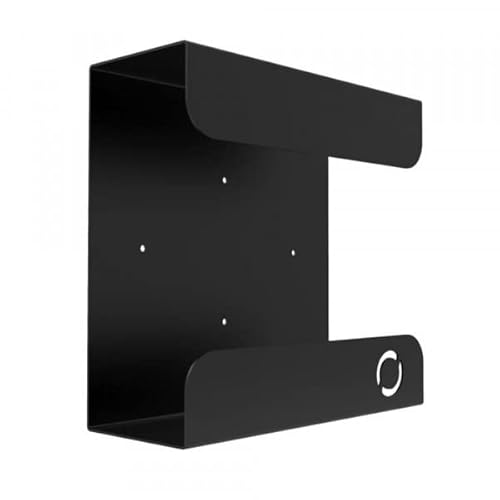
Oeveo UPS Mount 143 (Single)

CyberPower ST425 Standby UPS

CyberPower ST625U Standby UPS

APC APCRBC123 Replacement Battery

CyberPower CP2000PFCRM2U PFC Sinewave UPS

CyberPower OR500LCDRM1U Smart App UPS

CyberPower CP1500PFCRM2U PFC Sinewave UPS
Taking A Closer Look At The Options
The CP1500AVRLCD3 is the kind of mid-tower UPS that disappears under a desk and earns its keep the first time the lights flicker. It runs line-interactive topology, meaning it actively corrects minor voltage swings without dipping into the battery for every little sag. Automatic Voltage Regulation (AVR) handles brownouts and overvoltages in the background, so the battery only kicks in for actual outages.
An LCD on the front reports load level, battery charge, and input voltage at a glance. For a home office with a desktop, modem, router, and monitor plugged in, runtime lands in a useful range for saving work and shutting down gracefully. Compared to the smaller CyberPower ST625U later in this list, you get far more headroom for the same surge-protection footprint.
A Strong Showing
- Built-in LCD provides live readouts of load, charge, and input voltage, so you see what the UPS is doing without software.
- AVR corrects minor power fluctuations without draining the battery, extending its useful life during everyday brownouts.
- Mid-tower form factor fits neatly under most desks while still offering ample outlet count for a full workstation.
- Simulated sine wave output suits most desktops, monitors, and networking gear in a typical home or small office.
- Surge protection runs from day one, so connected equipment is shielded even before the battery backup engages.
Things To Consider
- The simulated sine wave may not pair cleanly with certain active-PFC workstations, where the CP1500PFCLCD below is a safer bet.
- Replacement batteries are an eventual ownership cost, and owners commonly swap cells every three to five years depending on usage.
- The front LCD is tiltable but the readout can be hard to read from standing height under a desk.
At A Glance
Made For
Remote workers and home-office users running a single desktop with a monitor, router, and modem on the same outlet strip.
Consider Something Else When
Anyone running an active-PFC power supply on a workstation or gaming rig should look at the CyberPower CP1500PFCLCD PFC Sinewave UPS instead, since true sine wave output plays nicer with that hardware.
The CP1500PFCLCD earns its Premium Pick badge by delivering true sine wave output, which matters once you plug in a workstation with an active-PFC power supply. Active PFC is a power-correction design in modern PSUs that expects clean, smooth AC power, and a simulated sine wave can cause buzzing, instability, or shutdowns. This unit produces the smooth waveform those supplies want.
It carries the same line-interactive topology and AVR as the CP1500AVRLCD3 covered above, plus a color multifunction LCD for quick status checks. You also get a multifunction control panel that surfaces runtime estimates and load percentage at a glance. For anyone whose PC has behaved strangely on cheaper UPS units, switching to pure sine wave often clears the issue.
What Pays Off
- Pure sine wave output keeps active-PFC power supplies happy, avoiding the buzzing or random shutdowns common with simulated sine units.
- AVR tightens up minor voltage dips and surges without engaging the battery, preserving runtime for actual outages.
- Color multifunction LCD surfaces load, charge, and runtime estimates at a glance.
- Mini-tower form factor fits alongside most desktops without dominating floor space.
- Surge protection activates from day one, so connected gear stays shielded even before the battery is called on.
Points To Keep In Mind
- Pure sine wave UPS units typically command a higher upfront price than simulated sine wave models with similar capacity.
- Runtime at full load is shorter than you might expect, so heavy workstations should plan around graceful shutdowns rather than long sessions off-grid.
Whose Shelf It Belongs On
Owners of modern workstations and gaming PCs with active-PFC power supplies who want the cleanest possible waveform during an outage.
Look Elsewhere When
Shoppers on tighter budgets running simpler home desktops will get more for their money from the CyberPower EC850LCD Ecologic UPS, which covers basic backup without the sine wave premium.
Where the larger CyberPower towers above aim at full workstations, the EC850LCD shrinks the footprint while keeping an LCD status readout. It’s built around standby topology, meaning it passes wall power straight through until an outage triggers battery mode. For a compact desktop, a router, and a monitor, that’s usually plenty.
The Ecologic name hints at the headline feature: when the connected computer shuts down or goes to sleep, the UPS detects that idle state and cuts power to its own outlets to save energy. Anyone running a media center or small office PC that spends hours idle gets a small but real reduction in vampire draw. It’s a quiet, focused design that doesn’t pretend to be more than it is.
Benefits That Matter
- Compact form factor tucks behind a desk or beside a media center without hogging floor space.
- Ecologic mode detects when connected gear is asleep or off and powers down its own outlets to cut waste.
- Front LCD keeps you informed on load and battery status without any extra software.
- Simulated sine wave output handles the kind of basic desktops and networking hardware common in home setups.
- Surge protection runs continuously, even when the battery isn’t in play.
Honest Caveats
- Standby topology doesn’t condition power the way the line-interactive CP1500AVRLCD3 does, so brownouts reach gear briefly before the battery takes over.
- Capacity is modest, so running a full gaming rig and monitor will leave very little runtime during a real outage.
The Right Fit
Home users with modest PCs, streaming setups, or small offices where compact size and energy savings matter more than long runtime.
Skip It When
Anyone running a beefy workstation with active-PFC power supplies should grab the CyberPower CP1500PFCLCD PFC Sinewave UPS for cleaner power and far more headroom.
The Oeveo UPS Mount 143 is a refreshing change of pace: it’s not a UPS at all, but a steel wall bracket designed to hold one. For anyone whose desk already looks like a cable jungle, lifting a UPS off the floor is a small lifestyle improvement. It’s built with a flat black powder coat finish and rated for up to 70 lbs of weight.
The bracket is compatible with both APC and CyberPower units, covering the bulk of mainstream consumer UPS hardware. All mounting hardware ships in the package, so installation usually means a stud finder, a drill, and a few minutes. Compared to leaving a brick-shaped UPS under a desk, mounting it vertically also improves airflow around the battery.
Good Reasons To Consider
- Wall-mount design reclaims floor space, which matters in tight home offices and workshop benches.
- 70 lb weight capacity covers mainstream consumer UPS units from APC and CyberPower without flex.
- Flat black powder coat finish resists scuffs and matches most office décor.
- All mounting hardware is included, so you don’t need a separate trip to the hardware store.
- Lifting the UPS off the floor tends to improve airflow and reduce dust buildup around the battery vents.
Softer Spots
- Requires a solid wall surface and proper anchors; drywall-only installs may need extra reinforcement for heavier units.
- The bracket is sized for common UPS footprints, so unusually tall tower models might not seat flush.
Feature Snapshot
Best Suited To
Tidy home offices and workshops where floor space is at a premium and the UPS needs to stay accessible without being a tripping hazard.
Reach For A Different Pick When
Anyone who hasn’t picked a UPS yet should start with the CyberPower CP1500AVRLCD3, then add the Oeveo bracket once the unit is in hand.
The ST425 is the entry point in CyberPower’s desktop UPS lineup, and it leans hard into value. It uses standby topology like the EC850LCD above, passing wall power straight through until an outage flips it into battery mode. For a basic home computer or a small entertainment setup, that’s plenty for saving files and shutting down.
The form factor is compact enough to disappear behind a monitor or under a shelf. Surge protection for lightning-induced spikes runs continuously, even when the battery isn’t doing anything. Compared to the slightly larger ST625U covered next, capacity is more limited, but for a stripped-down setup the ST425 covers the essentials without bloat.
Where It Excels
- Standby topology keeps the unit lightweight and affordable, ideal for basic home computers and routers.
- Continuous surge protection shields gear from lightning-induced spikes even when the battery isn’t engaged.
- Compact chassis tucks behind a monitor or under a shelf without dominating desk space.
- Enough battery runtime for a graceful shutdown rather than a long off-grid session.
Worth Noting
- Capacity is on the slim side, so connecting a heavy monitor and a tower at once leaves very little headroom.
- Standby topology offers no voltage conditioning, unlike the line-interactive CP1500AVRLCD3.
Quick Facts
Perfect Match For
First-time UPS shoppers running a single basic home computer or a small entertainment system that just needs surge protection and short backup.
Where A Sibling Pick Shines
The CyberPower ST625U adds USB monitoring and a touch more capacity for only a small step up, which suits slightly heavier setups.
The ST625U takes the same standby-platform idea behind the ST425 and adds a USB monitoring port plus a slightly higher capacity rating. That USB connection is genuinely useful, because it lets the UPS talk to a connected PC and trigger automatic shutdowns when the battery runs low. For anyone who travels or sleeps through the occasional outage, that software handoff is the whole ballgame.
The unit still relies on standby topology, so it won’t condition power the way line-interactive models do. But it covers the basics well: surge protection runs at all times, battery backup handles short outages, and the USB link turns the box into a smarter guardian for unattended desktops. It’s a thoughtful middle child in the CyberPower lineup.
Notable Upsides
- USB monitoring port lets the UPS communicate with a connected PC for graceful, automatic shutdowns.
- Slightly higher capacity than the ST425 covers a monitor plus a modest tower without straining the battery.
- Standby topology keeps weight and cost down while still delivering surge protection.
- Compact form factor fits under most desks or behind monitors.
Less Ideal Details
- No voltage regulation, so brownouts reach gear briefly before battery mode kicks in.
- Simulated sine wave output isn’t ideal for active-PFC power supplies; the CP1500PFCLCD handles that better.
Who Should Grab It
Home users running modest desktops who want USB-triggered shutdowns and a touch more capacity than the bare-bones ST425 offers.
Swap It Out When
Anyone needing voltage conditioning or longer runtime should step up to the CyberPower CP1500AVRLCD3 with AVR and an LCD readout.
The APCRBC123 isn’t a UPS; it’s the replacement cartridge that goes inside one. Specifically, it’s designed for APC SmartUPS models like the SMT750RM2UC and BX1350M, and using the genuine APC-branded cartridge is the safest way to restore the unit to its original specifications. Anyone who already owns a compatible APC UPS will eventually need this part.
The cartridge is a sealed VRLA (valve-regulated lead-acid) battery, the same maintenance-free chemistry used across most consumer UPS units. APC tests and approves each cell for compatibility with the target UPS firmware, which matters because third-party batteries sometimes trigger warning codes. For a long-term UPS owner, replacing the battery every few years is normal upkeep.
What Works In Its Favor
- Genuine APC-branded cartridge restores the UPS to original specifications without triggering unknown fault codes.
- Sealed VRLA battery is maintenance-free, so there’s no fluid to top off during the swap.
- APC tests the cartridge for compatibility with target UPS models, which removes the trial-and-error risk.
Practical Considerations
- Only fits specific APC models (SMT750RM2UC, BX1350M), so verify your UPS model before ordering.
- Replacement intervals typically run two to five years depending on discharge cycles and ambient temperature.
- Old batteries require proper recycling at a certified drop-off rather than household trash.
Built With In Mind
Existing owners of compatible APC SmartUPS units whose original battery has finally reached the end of its usable life.
Not Your Match When
Shoppers who haven’t picked a UPS yet should look at the CyberPower CP1500AVRLCD3 instead, since this cartridge won’t power anything on its own.
The CP2000PFCRM2U shifts the conversation from desktop towers into 2U rackmount territory. It produces true sine wave output for active-PFC power supplies and adds EMI/RFI filtering to clean up electrical noise that can creep through cheap power strips. For security systems, A/V racks, and prosumers with mixed sensitive gear, that combination is the point.
AVR keeps minor voltage swings from dipping into the battery, while surge protection and battery backup cover actual outages. The rackmount form factor means it slides into a server cabinet or shallow AV rack rather than living under a desk. Compared to the tower-format CP1500PFCLCD above, this unit trades desktop convenience for higher capacity and rack-friendly mounting.
Where It Helps
- True sine wave output plays well with active-PFC power supplies in workstations and A/V components.
- EMI/RFI filtering reduces line noise that can disrupt sensitive analog and digital gear.
- AVR corrects minor power fluctuations without engaging the battery, extending runtime for actual outages.
- 2U rackmount form factor fits standard server and AV racks without adapters.
Potential Drawbacks
- Rackmount format requires an actual rack or shelf, which limits placement in casual home setups.
- Higher capacity comes with added weight and heat output under sustained load.
Feature Card
Right Fit For
Prosumers and small studios with rackmounted A/V equipment or security systems that need clean sine wave power.
A Better Fit Elsewhere
Anyone working from a home office without a rack will find the tower-format CyberPower CP1500PFCLCD easier to place and just as gentle on active-PFC gear.
The OR500LCDRM1U squeezes battery backup into a slim 1U rackmount slot, which is the right shape for shallow network racks and small server closets. It pairs line-interactive topology with AVR, the same approach that makes the CP1500AVRLCD3 so steady under fluctuating wall power, just in a much shallower chassis.
The Smart App label means the unit pairs with CyberPower’s management software for remote monitoring and scheduled shutdowns. Six outlets handle a small cluster of networking gear or a department server, and the front LCD surfaces load and battery status without needing a separate display. For IT setups where rack depth is precious, this is a tidy answer.
Real-World Strengths
- 1U rackmount height fits shallow network racks without sacrificing precious vertical space.
- Line-interactive topology with AVR conditions brownouts and overvoltages before they reach connected gear.
- Smart App support enables remote monitoring and graceful shutdown scheduling for unattended servers.
- Front LCD keeps administrators informed on load and battery status at a glance.
Trade-Offs
- Simulated sine wave output isn’t suitable for active-PFC power supplies, so workstations should use the CP1500PFCLCD.
- Capacity is modest, so heavy server loads will see shorter runtimes than higher-rated rackmount units.
Technical Highlights
Who It Suits Best
Network administrators and IT pros running small server racks, switches, and telecom gear that need rack-friendly backup without bulk.
Not Your Match When
Anyone looking for desktop backup should grab the CyberPower CP1500AVRLCD3, which is friendlier to floor placement and packs more capacity.
The CP1500PFCRM2U is the rackmounted cousin of the CP1500PFCLCD tower covered earlier, and it carries the same true sine wave output with EMI/RFI filtering. Where the larger CP2000PFCRM2U leans toward higher capacity, this unit lands in a middle ground that fits a wider variety of mixed A/V and networking racks.
AVR corrects minor voltage fluctuations without dipping into the battery, and surge protection stays active at all times. The rackmount format suits security systems, audio/visual equipment, and networking hardware that require active-PFC compatibility. For rack owners who want clean sine wave power without stepping up to the largest unit in the lineup, this model sits right in the sweet spot.
What Earns Its Place
- True sine wave output pairs cleanly with active-PFC power supplies across workstations and A/V components.
- EMI/RFI filtering reduces electrical noise that can degrade analog and digital signals.
- AVR tightens up minor voltage swings without engaging the battery, preserving runtime.
- Rackmount form factor integrates into standard server and AV cabinets.
Where It May Fall Short
- Rackmount chassis isn’t useful without an actual rack or shelf to host it.
- Capacity sits below the larger CP2000PFCRM2U, so heavy combined loads may drain it faster than expected.
Made For
Mixed-use AV and network racks that need pure sine wave power for active-PFC gear without the larger capacity of the CP2000PFCRM2U.
Consider Something Else When
Home users without a rack should pick the tower-format CyberPower CP1500PFCLCD, which delivers the same sine wave output in a desk-friendly shape.
What To Weigh Before Choosing A UPS
Picking battery backups for computers comes down to matching capacity, waveform, and topology to your actual hardware. A useful starting point is the VA (volt-ampere) rating, which roughly translates to how much gear the UPS can carry; underestimating means the battery drains almost instantly during an outage.
Pure sine wave output matters most when your PC, monitor, or A/V gear uses an active-PFC power supply, since those expect smooth AC. Simulated sine wave units cost less and work fine for most basic desktops, routers, and modems, though some active-PFC hardware will complain.
Line-interactive topology adds AVR, which corrects small voltage swings before they reach the battery. For homes with frequent brownouts or storms, that extra conditioning extends battery life noticeably. Standby topology is cheaper and lighter, but it lets minor dips pass straight through to connected gear.
The runtime you actually need depends on how much time you want to save work and shut down gracefully. A few minutes is enough for most desktops, while server racks often want ten minutes or more for clean shutdowns.
Smart Spending And Slip-Ups Across These Picks
Pitfalls Shoppers Hit
Under-sizing the VA rating is the most common mistake, since people tend to count only their tower and forget the monitor, router, and peripherals. Adding up every plugged-in device’s watt draw and then multiplying by 1.2 gives a safe target.
Another slip is buying a simulated sine wave unit for an active-PFC workstation, then wondering why the PC shuts off randomly during brownouts. The fix is either a pure sine wave model or active-PFC-friendly hardware.
When Paying More Pays Off
The premium for pure sine wave and AVR pays back in two ways: gear lasts longer because it isn’t exposed to waveform noise, and batteries last longer because they’re not draining on every minor sag.
Higher-capacity rackmount units earn their cost when the alternative is losing a render, an A/V stream, or a server process to an abrupt outage. For most home offices, a mid-range tower like the CP1500AVRLCD3 covers the basics without overspending.
Frequently Asked Questions
How Long Will A UPS Keep My Computer Running During An Outage?
Runtime depends on the UPS capacity and how much gear is plugged in, but most home units deliver five to fifteen minutes for a typical desktop and monitor, long enough to save work and shut down.
Do I Need Pure Sine Wave Or Is Simulated Sine Wave Good Enough?
Simulated sine wave works for most basic desktops, monitors, and networking gear, while pure sine wave is the safer pick for active-PFC power supplies and sensitive A/V components.
How Often Should I Replace The Battery Inside A UPS?
Sealed lead-acid UPS batteries typically last two to five years depending on discharge cycles, ambient temperature, and how often the unit actually runs on battery.
Can A UPS Protect Against Lightning Strikes?
A UPS includes surge protection that handles small spikes and nearby lightning-induced surges, but a direct strike can overwhelm any consumer UPS and may require a separate heavy-duty surge protector at the panel.
What Is AVR And Why Does It Matter?
AVR, or Automatic Voltage Regulation, corrects minor brownouts and overvoltages without switching to battery power, which extends battery life and keeps connected gear stable during everyday grid fluctuations.
Closing Remarks
Battery backups for computers earn their keep the moment a storm rolls through or a transformer hiccups down the street. Match the capacity to your actual gear, pick a waveform that plays nicely with your power supplies, and you can stop watching the weather radar every time a thundercloud drifts overhead. Any of the units above will give your workstation a fighting chance; the rest comes down to how much headroom you want under the hood.