Brownouts don’t warn you. A storm rolls through, the lights blink, and the desktop tower mid-render just dies. For anyone running a home office, a network rack, or a NAS full of irreplaceable files, a quality battery backup turns a five-second outage into a non-event. The ten picks below cover full replacement UPS units, extended-run battery packs, and the mounting hardware that keeps everything tidy. Each one fits a different kind of setup, from a single workstation to a multi-drive NAS closet.
The Leading Options At A Glance

UPSBatteryCenter Replacement Battery for APC Back-UPS BN4001

APC External Battery for Back-UPS Pro BR1500G
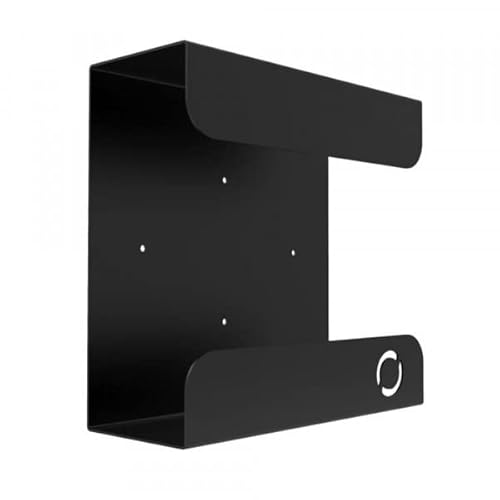
Oeveo UPS Mount 143 Wall Bracket

Glitwing UPS Mount 548 Steel Bracket

APC APCRBC123 Replacement Battery

GOLDENMATE 1000VA/800W Lithium UPS Gray

GOLDENMATE 1500VA/1000W Lithium UPS White

GOLDENMATE 1000VA/800W Lithium UPS White
GOLDENMATE 1000VA/600W Lithium UPS White

UGREEN NAS UPS US3000 12000mAh
Meet The Standout Selections
The UPSBatteryCenter cartridge is a third-party replacement cell built specifically for the APC Back-UPS NS BN4001, a compact unit often found guarding modems and small networking stacks. The pitch is straightforward: when the original battery inside your BN4001 finally gives up after a few years of constant float charging, you swap in this cartridge and the unit behaves like new again. For most home networks, that means a few extra minutes of bridge time during a flickered outage, enough to save a config or finish a download.
This kind of drop-in refresh matters more than a brand-new UPS would for a specific crowd: people who already own the BN4001 and don’t want to replace the whole enclosure. As we’ll see with the APCRBC123 later, an OEM cartridge often carries a price premium, and this UPSBatteryCenter option lands noticeably lower. For shoppers comfortable with a non-OEM cartridge in a home setting, the value math tends to work out.
Useful Highlights
- Direct replacement for the BN4001, so installation usually means opening the bay and slotting the cartridge in
- Lower cost than buying a whole new UPS unit when the original battery has aged out
- Restores the BN4001’s runtime closer to factory levels for typical networking loads
- Keeps legacy APC hardware in service, which is useful if your rack is built around that specific form factor
Points To Keep In Mind
- Third-party cells may not carry the same longevity as factory cartridges in some reported cases
- Only fits the BN4001, so it’s a non-starter for owners of other APC models
Right Fit For
Home network owners running a legacy BN4001 who want a budget-conscious battery refresh without replacing the whole unit.
Skip It When
You own a different APC model like the SMT750 or BX1350, in which case the APC APCRBC123 cartridge is the compatible fit.
The APC BR24BPG external battery pack is the dedicated add-on for the Back-UPS Pro BR1500G, a 1500VA tower unit favored by prosumer workstations and gaming rigs. The pack itself doesn’t add outlets, surge protection, or sine wave output: it stacks extra lead-acid cells behind the main UPS so the whole system can run longer before shutting down. For most office settings, that means turning a 5-minute runtime into something closer to 20 minutes on a moderate load.
The way it connects matters. A single cable runs from the BR1500G to the external pack, and the two behave as one combined battery bank. Compared to a brand-new replacement UPS, the BR24BPG is a smaller purchase and keeps the same control software, the same outlet layout, and the same chassis you’re already used to. That’s a quiet kind of convenience worth noting.
Points In Its Favor
- Multiplies the BR1500G’s runtime, giving more headroom for long outages or graceful shutdowns
- Integrates with the host UPS software so you get one consistent status readout
- Lower cost than buying a second standalone UPS for the same load
- APC-backed accessory designed specifically for the BR1500G, so compatibility is built in
Trade-Offs
- Adds the footprint of a second battery unit beside your tower
- Only useful with the BR1500G; other APC models need different external packs
Feature Snapshot
Best Suited To
BR1500G owners in areas with frequent or extended outages who want hours of protected runtime rather than minutes.
Another Choice May Suit
Shoppers without a BR1500G host unit should look at the GOLDENMATE 1500VA/1000W Lithium UPS for a full standalone replacement instead.
The Oeveo Mount 143 is a single-unit steel wall bracket sized for compact UPS hardware, with broad compatibility across popular APC and CyberPower models. The 11-inch depth and 4.3-inch width give the bracket a modest footprint, and the 70-pound weight rating handles most home-office UPS towers without complaint. For most under-desk setups, that’s enough headroom to clear the floor entirely.
Compare that to leaving a UPS on the carpet behind a desk: dust collects around the vents, you kick it during vacuuming, and the cables tangle into a small disaster. The mount flips that picture by lifting the unit onto a wall stud or under a desk surface, where it stays out of the way and breathes better. The flat black powder coat is a quiet detail that blends into most setups rather than drawing attention.
Everyday Wins
- Mounting hardware ships in the box, so a standard install needs only a drill and a stud finder
- 70-pound capacity covers small and mid-size UPS units comfortably
- Wide compatibility with both APC and CyberPower lines reduces the guesswork
- Made in the USA, which can matter to shoppers prioritizing domestic production
Points To Note
- Single-pack only, so multi-unit installations require buying multiple brackets
- At 4.3 inches of width, the largest tower UPS units may not fit comfortably
Whose Shelf It Belongs On
Home-office users with one compact-to-mid-size UPS who want a clean wall or under-desk install.
Where Another Pick Suits Better
Owners of a heavier or wider tower UPS should look at the Glitwing UPS Mount 548, which trades the lighter 16-gauge steel for a heavier build.
The Glitwing UPS Mount 548 takes the same basic idea as the Oeveo bracket and pushes it toward heavier hardware. The 16GA cold-rolled steel body gives the mount a stiffer feel under load, and the flat black powder coat resists scuffs once installed. The bracket holds the UPS vertically against a wall, a desk side, or the inside of a cabinet, so a heavier tower doesn’t have to live on the floor anymore.
The honest read is that this is a mount for someone who already knows their UPS is heavy and isn’t going anywhere. Compared to the Oeveo Mount 143, this one trades lighter construction for a beefier frame, which matters more in a server closet or workshop than it does in a clean home office. The tradeoff shows up in price and weight, but for the right setup, that’s an easy swap.
Features That Help
- 16GA cold-rolled steel gives the mount real rigidity for heavier UPS towers
- Powder-coated finish helps the bracket resist scuffs and surface wear over time
- Vertical orientation keeps cooling vents clear and the UPS out of foot traffic
- Works on a wall, desk, or cabinet side, giving the install a few placement options
A Few Limitations
- Heavier steel means more work during install, especially over a drywall-only surface
- Single-unit bracket, so multi-rack installs need more than one purchase
Spec Overview
Perfect Match For
Workshop, server closet, or basement owners running a heavier APC Back-UPS tower that needs a sturdier anchor point.
Not Your Match When
Lightweight single-monitor setups are usually better served by the Oeveo Mount 143 and its 70-pound rating.
The APC APCRBC123 is the genuine factory replacement cartridge for two of the brand’s most common office UPS units, the SMT750RM2UC and the BX1350M. The RBC (Replacement Battery Cartridge) is a sealed lead-acid module (VRLA) sized to drop directly into the host UPS, and APC’s spec sheet calls for confirming the cartridge carries the APC branding on arrival. For most small server rooms, that confirmation step is what removes the guesswork.
Compared to the budget UPSBatteryCenter cartridge in this list, the APCRBC123 sits at a higher cost tier and arrives as an OEM part. The trade-off is consistency: the chemistry, fit, and firmware handshake all match what the original unit shipped with. For shoppers with mission-critical gear on the other end of the cable, that match is usually worth a few extra dollars.
Where It Delivers
- Genuine OEM cartridge restores the host UPS to original spec without firmware surprises
- Direct fit for SMT750RM2UC rackmount and BX1350M tower models, so no rewiring is needed
- VRLA sealed construction means no acid spills or routine water top-offs
Worth Noting
- Priced higher than third-party alternatives, which matters in multi-unit environments
- Lead-acid chemistry is heavier than the lithium UPS options later in this list
Who Should Grab It
IT-leaning shoppers and small business owners running SMT750 or BX1350 units who want a plug-compatible OEM refresh.
A Better Fit Elsewhere
Home users on a tighter budget running an older BN4001 should consider the UPSBatteryCenter replacement instead.
The GOLDENMATE 1000VA/800W in gray is the entry into the brand’s lithium UPS line, rated for 800 watts of real load capacity. The unit ships with eight NEMA 5-15R outlets (the standard three-prong outlets used across North America), all of which carry both surge protection and battery backup, plus an AC power cord in the box. A built-in Battery Management System (BMS) and an active cooling fan round out the hardware, with PP45 terminals providing the connection points for the internal battery.
The shift from sealed lead-acid to lithium iron phosphate (LiFePO4) is the headline change. Lithium UPS units typically weigh less, run cooler, and last more charge cycles than their lead-acid predecessors. For most home offices, that means a unit you can mount on a shelf or tuck behind a monitor without it feeling like a small lead brick, and a battery that should outlast the rest of the hardware.
Everyday Perks
- Lighter than a comparable lead-acid UPS, so shelf and wall placement get easier
- Eight outlets all carry both surge and battery protection, so there’s no guessing which plug does what
- Active cooling fan keeps internal temperatures in check during long runtime events
Small Caveats
- Cooling fan adds a small amount of background noise during heavy load events
- Gray finish may not blend into a white-themed setup the way the white version does
Quick Facts
Who It Suits Best
Home-office users running a single PC plus monitor and a small network stack who want lithium longevity without stepping up to the 1500VA tier.
Look Elsewhere When
Power-hungry workstation owners with multiple monitors and a tower should look at the GOLDENMATE 1500VA/1000W model instead.
The GOLDENMATE 1500VA/1000W is the highest-wattage unit in this lineup, built around a 51.2V 5.8Ah LiFePO4 battery pack rated for over 10 years of service and more than 3,000 charge cycles. The brand markets the chemistry as dropping the total cost of ownership by more than 40% compared to a lead-acid unit cycling at the same load. In plain terms, you swap the battery far less often over the life of the unit.
For most high-end workstations, the 1000W real capacity is the headline number. A tower PC, two monitors, a NAS, and a network switch can all live on this single unit during a sustained outage. The white finish also gives the UPS a less industrial look on a shelf, which matters more than you’d think in a visible home office corner.
A Favorable Mix
- 1000W real load capacity covers full workstations, not just networking gear
- LiFePO4 chemistry promises 10+ years of service and thousands of cycles, reducing replacement churn
- White cabinet fits into modern home-office aesthetics more cleanly than gray or black alternatives
Possible Compromises
- Larger footprint than the 1000VA siblings, so under-desk placement may be tight
- Premium chemistry commands a higher upfront cost than lead-acid alternatives
Details At A Glance
Who Will Love This
Prosumers running a full tower, dual monitors, and a NAS who want a single lithium UPS to anchor the whole desk.
Swap It Out When
Smaller networking-only loads are better matched by the 1000VA/600W model later in the list, which avoids spending on capacity you won’t use.
The white version of the GOLDENMATE 1000VA/800W shares its electrical specs with the gray unit but advertises an even higher cycle count: more than 5,000 charge cycles across the LiFePO4 battery pack. The brand’s own total-cost-of-ownership math puts the savings at over 40% versus a lead-acid unit running the same duty cycle. For most always-on environments, that math is what justifies stepping up to lithium in the first place.
The cosmetic difference is the obvious one. The white cabinet fits a light-themed office the way the gray version fits a darker one. Functionally, the unit still offers surge-protected battery-backed outlets, BMS monitoring, and a cooling system tuned for low noise. So the buying decision between this and the gray version comes down less to features and more to which finish you actually want to look at every day.
Why It Works Well
- 5,000+ cycle rating outpaces many competing lithium UPS units in the same tier
- White finish blends into modern home-office setups without the industrial vibe
- LiFePO4 chemistry is thermally stable compared to older lithium chemistries
Where It May Fall Short
- 800W real capacity caps the supported load below the 1500VA model
- Active cooling still produces some fan noise under sustained load
Built With In Mind
Always-on network and home-server owners who want maximum cycle life and a clean white cabinet.
Reach For A Different Pick When
Workstations with multiple monitors and a tower should step up to the GOLDENMATE 1500VA/1000W for the extra wattage headroom.
The 1000VA/600W member of the GOLDENMATE family earns its slot in this roundup through a more specific feature: an upgraded communication port and a USB cable in the box. Once connected to a Windows PC, Mac, or NAS, the UPS can trigger a safe automatic shutdown via system settings without extra software. For most unattended machines, that removes the “I hope nobody was home to hit the button” problem during an extended outage.
The 600W real load rating is the trade-off. That’s plenty for a router, a modem, a small NAS, and a single PC, but it’s not enough for a power-hungry gaming tower plus a 4K monitor plus studio gear. Where this unit shines is in setups where graceful unattended shutdown is the actual goal, and the load is moderate enough to fit inside the rating.
Positive Takeaways
- Built-in USB and communication port enable automatic safe-shutdown on PC, Mac, and NAS
- Lighter lithium footprint keeps the unit easy to mount on a shelf or wall
- White finish matches a modern desk setup without sticking out
Things To Weigh
- 600W rating is the lowest real capacity in the GOLDENMATE lithium lineup, limiting the supported load
- Auto-shutdown requires the host device to be awake and configured to receive the UPS signal
Made For
Home offices with a single PC or NAS that benefit from automated graceful shutdown when the power goes out.
Where A Sibling Pick Shines
Heavier workstation loads are better served by the 1000W 1500VA model, which raises the wattage ceiling without losing the lithium upside.
The UGREEN NAS UPS US3000 is a focused solution for one specific scenario: a UGREEN DXP-series NAS losing wall power mid-write. The unit delivers up to 120W over DC, draws from a 12,000mAh built-in lithium-ion pack, and connects directly to the NAS’s DC input. The compatibility list is narrow on purpose, covering the 2-bay and 4-bay DXP and DH models UGREEN currently sells.
The tradeoff is right there in the compatibility notice. This UPS is explicitly not compatible with the DXP6800 or DXP8800 series, so shoppers running those larger units should stop here. For everyone on the supported list, the design does exactly what a NAS battery backup should: keep the drives alive long enough to flush the write cache and shut down cleanly, all in a small, quiet brick.
The Upside
- 120W DC output matches the input spec of supported UGREEN NAS units, so no inverter overhead
- 12,000mAh lithium-ion pack gives the NAS time for a clean controlled shutdown
- Built-in protection covers surge, over-charge, over-current, and short-circuit conditions
- Compact form factor stacks neatly beside or behind the NAS enclosure
Details To Watch
- Only works with specific UGREEN NAS models, so cross-brand shoppers should look elsewhere
- 120W output ceiling rules out powering the larger DXP6800 and DXP8800 series
Who It Suits Best
UGREEN DXP2800, DXP4800, or DXP4800 Plus owners who want a quiet DC-native backup that sits right next to the NAS.
Not Your Match When
You need to protect a full PC and monitor setup, in which case one of the GOLDENMATE lithium UPS units covers a much wider load.
What To Weigh Before Choosing Battery Backups
Match Wattage To Your Real Load
A UPS rated at 1000VA (volt-amps) but only 600W (watts) covers a different load than a unit rated at 1000W. The wattage number is the one that matters: it represents the real power the unit can deliver to your gear. Add up the wattage of your PC, monitors, router, and NAS, then pick a UPS with at least 25% headroom above that total.
Under-sizing is the most common mistake in this category. A UPS running at 90% of its rated capacity will trip faster, run hotter, and age the battery more quickly than one operating at 60%. For most home offices, that 25% buffer is the difference between finishing a save and watching the screen go black.
Runtime Is Not The Same As Capacity
A higher VA rating doesn’t always mean more minutes of backup. Runtime depends on how much load you actually draw from the outlets. A 1000VA UPS powering a small router might run for an hour, while the same UPS powering a gaming tower might last only three minutes. The honest math is watts, not VA.
External battery packs, like the APC BR24BPG, exist specifically to extend runtime without buying a second full UPS. For most users facing long regional outages, that extension matters more than a slightly higher base VA rating on the host unit.
Lithium Versus Lead-Acid Trade-Offs
Lithium iron phosphate (LiFePO4) UPS units cost more up front but last far longer on the cycle count, which is the number of full charge-discharge cycles the battery can handle before its capacity drops noticeably. Where a sealed lead-acid UPS might deliver a few hundred cycles, a LiFePO4 unit routinely advertises 3,000 to 5,000+ cycles. The chemistry also runs cooler and weighs less, which matters for shelf and wall placement.
For network gear and NAS units that stay powered 24/7, the cycle math usually wins. For a desktop PC that only sees occasional outages, the cheaper lead-acid path can still make sense if the upfront cost is the priority.
Key Considerations Across These Picks
Where Shoppers Go Wrong
The first trap is buying based on VA alone and ignoring wattage. A unit with high VA but low real wattage will still shut off the moment your load exceeds that watt ceiling. The second is assuming a UPS will protect against a direct lightning strike or a wiring fault: surge protection in a consumer UPS is built for typical grid events, not catastrophic surges. For the latter, a dedicated surge protector at the panel is the right tool.
Another common slip is buying a UPS that’s too small for the gear, then leaving it at 95% load every day. That shortens battery life, triggers more frequent fan activity, and can cause nuisance shutdowns when other devices spin up.
When Paying More Pays Off
The step from a budget replacement cartridge to an OEM APC APCRBC123, or from a sealed lead-acid UPS to a LiFePO4 unit, costs more at the register but pays back over the service life. A genuine OEM cartridge restores the UPS to its original behavior, which matters if your gear is running critical workloads. A lithium unit can outlast two or three lead-acid replacements, which matters if the UPS sits in an always-on rack.
The upgrade makes the most sense when the UPS protects something you’d actually miss during a forced shutdown: a NAS with no redundancy, a workstation mid-project, or networking gear that supports remote work. For a lamp and a phone charger, the budget tier is the right call.
Frequently Asked Questions
How long will a battery backup actually run my equipment?
Runtime depends on the wattage your gear draws and the capacity of the UPS battery. A 600W unit powering a small network stack may run for an hour, while the same unit powering a gaming PC may last only a few minutes.
External battery packs and LiFePO4 chemistry both extend the usable window, sometimes into multi-hour territory for very light loads.
Do I really need a pure sine wave output?
Pure sine wave (a smooth, wall-outlet-quality AC waveform) matters most for active PFC power supplies (a type of power supply common in modern workstations and servers) and sensitive electronics like some medical or audio gear. For a basic router, modem, or older PC, simulated sine wave is usually fine.
Check your device’s power supply spec before assuming you need the more expensive pure sine wave UPS tier.
How often should I replace the battery inside a UPS?
Sealed lead-acid UPS batteries typically last three to five years under normal float-charging conditions. LiFePO4 batteries often run past the 10-year mark, especially in cooler environments with moderate load.
A UPS that beeps, shows a replace-battery indicator, or fails its self-test is the clearest signal that the cartridge is at end of life.
Can a UPS protect against lightning strikes?
Standard consumer UPS surge protection handles typical grid events and small surges. A direct or nearby lightning strike can overwhelm that protection entirely.
For buildings in lightning-prone areas, a dedicated panel-level surge protector in addition to the UPS gives a more layered defense.
What’s the difference between a UPS and a surge protector?
A surge protector guards against voltage spikes but does not keep power flowing when the wall outlet dies. A UPS (uninterruptible power supply) does both: it conditions surges and supplies battery power for the minutes or hours after an outage starts.
If you only need spike protection for a lamp or phone charger, a surge strip is enough. If you need to ride through an outage, a UPS is the right tool.
Closing Remarks
The right battery backup is the one that fits the wattage of your gear, the runtime your work demands, and the chemistry your budget supports. For most home offices, a LiFePO4 UPS in the 1000VA tier hits a comfortable middle ground, while dedicated NAS owners and IT-leaning shoppers will find a tighter fit in the more specialized picks above. Match the unit to the load, and the rest is patience during the next storm.